github.com/laurent22/joplin @ios-v20.0.1 sqlite
README




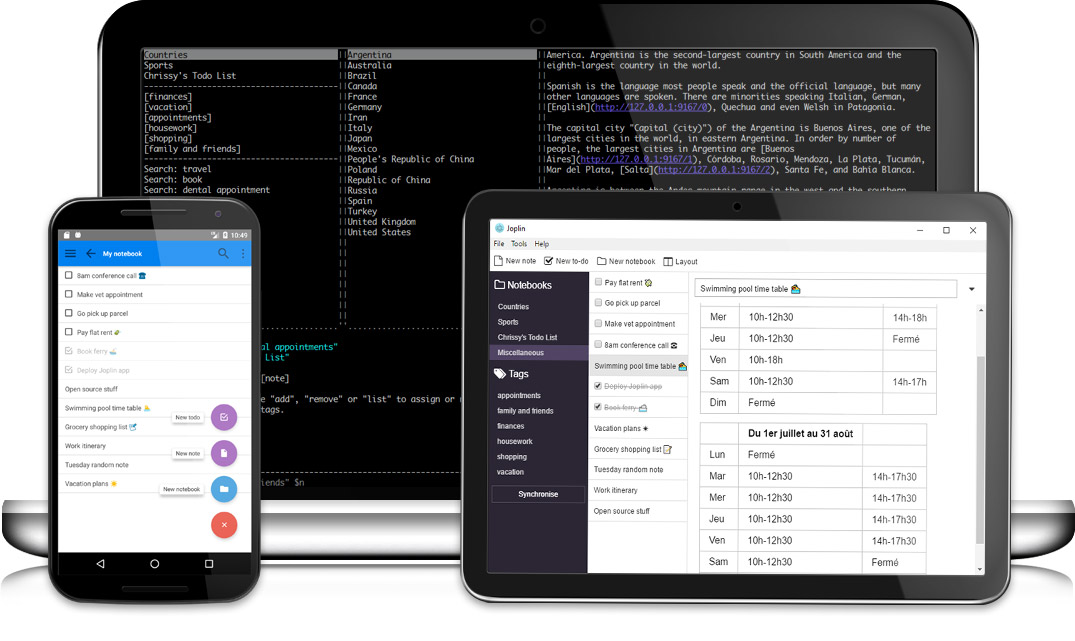
 Joplin is a free, open source note taking and to-do application, which can handle a large number of notes organised into notebooks. The notes are searchable, can be copied, tagged and modified either from the applications directly or from your own text editor. The notes are in Markdown format.
Notes exported from Evernote via .enex files can be imported into Joplin, including the formatted content (which is converted to Markdown), resources (images, attachments, etc.) and complete metadata (geolocation, updated time, created time, etc.). Plain Markdown files can also be imported.
The notes can be synchronised with various cloud services including Nextcloud, Dropbox, OneDrive, WebDAV or the file system (for example with a network directory). When synchronising the notes, notebooks, tags and other metadata are saved to plain text files which can be easily inspected, backed up and moved around.
The application is available for Windows, Linux, macOS, Android and iOS (the terminal app also works on FreeBSD). A Web Clipper, to save web pages and screenshots from your browser, is also available for Firefox and Chrome.
Installation
Three types of applications are available: for the desktop (Windows, macOS and Linux), for mobile (Android and iOS) and for terminal (Windows, macOS, Linux and FreeBSD). All applications have similar user interfaces and can synchronise with each other.
Desktop applications
| Operating System | Download |
|---|---|
| Windows (32 and 64-bit) |  |
| macOS |  |
| Linux |  |
On Windows, you may also use the Portable version. The portable application allows installing the software on a portable device such as a USB key. Simply copy the file JoplinPortable.exe in any directory on that USB key ; the application will then create a directory called "JoplinProfile" next to the executable file.
On Linux, the recommended way is to use the following installation script as it will handle the desktop icon too:
wget -O - https://raw.githubusercontent.com/laurent22/joplin/dev/Joplin_install_and_update.sh | bashMobile applications
| Operating System | Download | Alt. Download |
|---|---|---|
| Android |  |
or download the APK file: 64-bit 32-bit |
| iOS |  |
- |
Terminal application
| Operating system | Method |
|---|---|
| macOS, Linux, or Windows (via WSL) | Important: First, install Node 12+. |
NPM_CONFIG_PREFIX=~/.joplin-bin npm install -g joplin
sudo ln -s ~/.joplin-bin/bin/joplin /usr/bin/joplin
By default, the application binary will be installed under ~/.joplin-bin. You may change this directory if needed. Alternatively, if your npm permissions are setup as described here (Option 2) then simply running npm -g install joplin would work.
To start it, type joplin.
For usage information, please refer to the full Joplin Terminal Application Documentation.
Unsupported methods
There are other ways to install the terminal application. However, they are not supported and problems must be reported to the upstream projects.
| Operating system | Method |
|---|---|
| macOS | brew install joplin |
| Arch Linux | An Arch Linux package is available here. To install it, use an AUR wrapper such as yay: yay -S joplin. Both the CLI tool (type joplin) and desktop app (type joplin-desktop) are packaged. You can also install a compiled version with the chaotic-aur repository. For support, please go to the GitHub repo. If you are interested in pre-release you have joplin-beta. |
Web Clipper
The Web Clipper is a browser extension that allows you to save web pages and screenshots from your browser. For more information on how to install and use it, see the Web Clipper Help Page.
Sponsors



 |

c-nagy |


chr15m |
|


fbloise |

h4sh5 |
|


joesfer |


maxtruxa |
|

mcejp |


piccobit |

ravenscroftj |
|


wasteisobscene | |
Table of contents
-
Applications
-
Support
-
Joplin API - Get Started
-
Joplin API - References
-
Development
-
Google Summer of Code 2021
-
About
Features
- Desktop, mobile and terminal applications.
- Web Clipper for Firefox and Chrome.
- End To End Encryption (E2EE).
- Note history (revisions).
- Synchronisation with various services, including Nextcloud, Dropbox, WebDAV and OneDrive.
- Offline first, so the
Extension points exported contracts — how you extend this code
IContextKeyExpression (Interface)Core symbols most depended-on inside this repo
pushShape
Languages
Modules by API surface
Dependencies from manifests, versioned
For agents
$ claude mcp add joplin \
  -- python -m otcore.mcp_server <graph>