github.com/simonwep/pickr @1.9.1 sqlite
README

Flat, Simple, Hackable Color-Picker.
Fully Featured Demo






<a href="https://opencollective.com/pickr/donate" target="_blank">
    <img src="https://user-images.githubusercontent.com/30767528/63641974-ade08c80-c6b7-11e9-827a-faa526b5c2bf.png" height="37"/>
</a>
<a href="https://www.buymeacoffee.com/aVc3krbXQ" target="_blank">
    <img src="https://user-images.githubusercontent.com/30767528/63641973-9d301680-c6b7-11e9-9d29-2ad1da50fdce.png"></a>
</a>
Features
- 🎨 Themes
- 🔄 Simple usage
- 🚫 Zero dependencies
- 🌈 Multiple color representations
- 🔍 Color comparison
- 🎚️ Opacity control
- 🖱️ Detail adjustments via mouse-wheel
- 📱 Responsive and auto-positioning
- 👆 Supports touch devices
- 🎨 Swatches for quick-selection
- ♿ Fully accessible and i18n
- 🌑 Shadow-dom support
Status of this project
[!IMPORTANT] This project might continue to get important security- and bug-related updates but its feature set is frozen, and it's highly unlikely that it'll get new features or enhancements.
The reason behind this decision is the way this tool has been build (monolithic, the core is one single file, everything is in plain JS etc.) which makes it incredible hard to maintain, tests become impossible at this stage without a complete rewrite, and the fun is gone at such a level of cramped complexity.
Personally I recommend building these UI-Related "widgets" directly into the app with the framework you're using which takes more time but in return gives you full power of how it should work and look like. Frameworks such as (p)react, vue and svelte will make it a breeze to develop such things within a day.
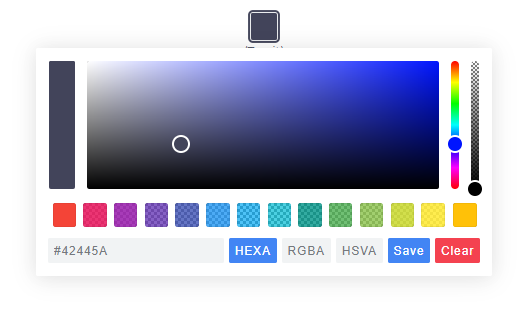
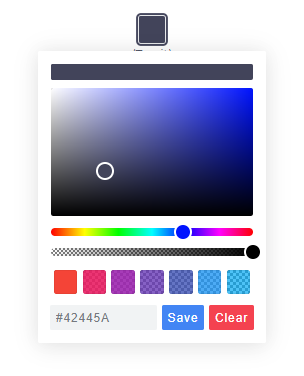
Themes
| Classic | Monolith | Nano |
|---|---|---|
 |
 |
 |
Nano uses css-grid thus it won't work in older browsers.
Getting Started
Node
Note: The readme is always up-to-date with the latest commit. See Releases for installation instructions regarding to the latest version.
Install via npm:
$ npm install @simonwep/pickr
Install via yarn:
$ yarn add @simonwep/pickr
Include code and style:
// One of the following themes
import '@simonwep/pickr/dist/themes/classic.min.css';   // 'classic' theme
import '@simonwep/pickr/dist/themes/monolith.min.css';  // 'monolith' theme
import '@simonwep/pickr/dist/themes/nano.min.css';      // 'nano' theme

// Modern or es5 bundle (pay attention to the note below!)
import Pickr from '@simonwep/pickr';
import Pickr from '@simonwep/pickr/dist/pickr.es5.min';
Attention: The es5-bundle (e.g. legacy version) is quite big (around a triple of the modern bundle). Please take into consideration to use the modern version and add polyfills later to your final bundle! (Or better: give a hint to users that they should use the latest browsers). Browsers such as IE are not supported (at least not officially).
Browser
jsdelivr:
<link rel="stylesheet" href="https://cdn.jsdelivr.net/npm/@simonwep/pickr/dist/themes/classic.min.css"/>
<link rel="stylesheet" href="https://cdn.jsdelivr.net/npm/@simonwep/pickr/dist/themes/monolith.min.css"/>
<link rel="stylesheet" href="https://cdn.jsdelivr.net/npm/@simonwep/pickr/dist/themes/nano.min.css"/>


<script src="https://cdn.jsdelivr.net/npm/@simonwep/pickr/dist/pickr.min.js"></script>
<script src="https://cdn.jsdelivr.net/npm/@simonwep/pickr/dist/pickr.es5.min.js"></script>
Be sure to load the pickr.min.js (or the es5 version) after pickr.min.css. Moreover the script tag doesn't work with the defer attribute.
Usage
// Simple example, see optional options for more configuration.
const pickr = Pickr.create({
    el: '.color-picker',
    theme: 'classic', // or 'monolith', or 'nano'

    swatches: [
        'rgba(244, 67, 54, 1)',
        'rgba(233, 30, 99, 0.95)',
        'rgba(156, 39, 176, 0.9)',
        'rgba(103, 58, 183, 0.85)',
        'rgba(63, 81, 181, 0.8)',
        'rgba(33, 150, 243, 0.75)',
        'rgba(3, 169, 244, 0.7)',
        'rgba(0, 188, 212, 0.7)',
        'rgba(0, 150, 136, 0.75)',
        'rgba(76, 175, 80, 0.8)',
        'rgba(139, 195, 74, 0.85)',
        'rgba(205, 220, 57, 0.9)',
        'rgba(255, 235, 59, 0.95)',
        'rgba(255, 193, 7, 1)'
    ],

    components: {

        // Main components
        preview: true,
        opacity: true,
        hue: true,

        // Input / output Options
        interaction: {
            hex: true,
            rgba: true,
            hsla: true,
            hsva: true,
            cmyk: true,
            input: true,
            clear: true,
            save: true
        }
    }
});
You can find more examples here.
Events
Since version 0.4.x Pickr is event-driven. Use the on(event, cb) and off(event, cb) functions to bind / unbind eventlistener.
| Event | Description | Arguments |
|---|---|---|
init |
Initialization done - pickr can be used | PickrInstance |
hide |
Pickr got closed | PickrInstance |
show |
Pickr got opened | HSVaColorObject, PickrInstance |
save |
User clicked the save / clear button. Also fired on clear with null as color. |
HSVaColorObject or null, PickrInstance |
clear |
User cleared the color. | PickrInstance |
change |
Color has changed (but not saved). Also fired on swatchselect |
HSVaColorObject, eventSource, PickrInstance |
changestop |
User stopped to change the color | eventSource, PickrInstance |
cancel |
User clicked the cancel button (return to previous color). | PickrInstance |
swatchselect |
User clicked one of the swatches | HSVaColorObject, PickrInstance |
Example:
pickr.on('init', instance => {
    console.log('Event: "init"', instance);
}).on('hide', instance => {
    console.log('Event: "hide"', instance);
}).on('show', (color, instance) => {
    console.log('Event: "show"', color, instance);
}).on('save', (color, instance) => {
    console.log('Event: "save"', color, instance);
}).on('clear', instance => {
    console.log('Event: "clear"', instance);
}).on('change', (color, source, instance) => {
    console.log('Event: "change"', color, source, instance);
}).on('changestop', (source, instance) => {
    console.log('Event: "changestop"', source, instance);
}).on('cancel', instance => {
    console.log('Event: "cancel"', instance);
}).on('swatchselect', (color, instance) => {
    console.log('Event: "swatchselect"', color, instance);
});
Where source can be
* slider - Any slider in the UI.
* input - The user input field.
* swatch - One of the swatches.
Options
```javascript const pickr = new Pickr({
// Selector or element which will be replaced with the actual color-picker.
// Can be a HTMLElement.
el: '.color-picker',

// Where the pickr-app should be added as child.
container: 'body',

// Which theme you want to use. Can be 'classic', 'monolith' or 'nano'
theme: 'classic',

// Nested scrolling is currently not supported and as this would be really sophisticated to add this
// it's easier to set this to true which will hide pickr if the user scrolls the area behind it.
closeOnScroll: false,

// Custom class which gets added to the pcr-app. Can be used to apply custom styles.
appClass: 'custom-class',

// Don't replace 'el' Element with the pickr-button, instead use 'el' as a button.
// If true, appendToBody will also be automatically true.
useAsButton: false,

// Size of gap between pickr (widget) and the corresponding reference (button) in px
padding: 8,

// If true pickr won't be floating, and instead will append after the in el resolved element.
// It's possible to hide it via .hide() anyway.
inline: false,

// If true, pickr will be repositioned automatically on page scroll or window resize.
// Can be set to false to make custom positioning easier.
autoReposition: true,

// Defines the direction in which the knobs of hue and opacity can be moved.
// 'v' => opacity- and hue-slider can both only moved vertically.
// 'hv' => opacity-slider can be moved horizontally and hue-slider vertically.
// Can be used to apply custom layouts
sliders: 'v',

// Start state. If true 'disabled' will be added to the button's classlist.
disabled: false,

// If true, the user won't be able to adjust any opacity.
// Opacity will be locked at 1 and the opacity slider will be removed.
// The HSVaColor object also doesn't contain an alpha, so the toString() methods just
// print HSV, HSL, RGB, HEX, etc.
lockOpacity: false,

// Precision of output string (only effective if components.interaction.input is true)
outputPrecision: 0,

// Defines change/save behavior:
// - to keep current color in place until Save is pressed, set to `true`,
// - to apply color to button and preview (save) in sync with each change
//   (from picker or palette), set to `false`.
comparison: true,

// Default color. If you're using a named color such as red, white ... set
// a value for defaultRepresentation too as there is no button for named-colors.
default: '#42445a',

// Optional color swatches. When null, swatches are disabled.
// Types are all those which can be produced by pickr e.g. hex(a), hsv(a), hsl(a), rgb(a), cmyk, and also CSS color names like 'magenta'.
// Example: swatches: ['#F44336', '#E91E63', '#9C27B0', '#673AB7'],
swatches: null,

// Default color representation of the input/output textbox.
// Valid options are `HEX`, `RGBA`, `HSVA`, `HSLA` and `CMYK`.
defaultRepresentation: 'HEX',

// Option to keep the color picker always visible.
// You can still hide / show it via 'pickr.hide()' and 'pickr.show()'.
// The save button keeps its functionality, so still fires the onSave event when clicked.
showAlways: false,

// Close pickr with a keypress.
// Default is 'Escape'. Can be the event key or code.
// (see: https://developer.mozilla.org/en-US/docs/Web/API/KeyboardEvent/key)
closeWithKey: 'Escape',

// Defines the position of the color-picker.
// Any combinations of top, left, bottom or right with one of these optional modifiers: start, middle, end
// Examples: top-start / right-end
// If clipping occurs, the color picker will automatically choose its position.
// Pickr uses https://github.com/Simonwep/nanopop as positioning-engine.
position: 'bottom-middle',

// Enables the ability to change numbers in an input field with the scroll-wheel.
// To use it set the cursor on a position where a number is and scroll, use ctrl to make steps of five
adjustableNumbers: true,

// Show or hide specific components.
// By default only the palette (and the save button) is visible.
components: {

    // Defines if the palette itself should be visible.
    // Will be overwritten with true if preview, opacity or hue are true
    palette: true,

    preview: true, // Display comparison between previous state and new color
    opacity: true, // Display opacity slider
    hue: true,     // Display hue slider

    // show or hide components on the bottom interaction bar.
    interaction: {

        // Buttons, if you disable one but use the format in default: or setColor() - set the representation-type too!
        hex: false,  // Display 'input/output format as hex' button  (hexadecimal representation of the rgba value)
        rgba: false, // Display 'input/output format as rgba' button (red green blue and alpha)
        hsla: false, // Display 'input/output format as hsla' button (hue saturation lightness and alpha)
        hsva: false, // Display 'input/output format as hsva' button (hue saturation value and alpha)
        cmyk: false, // Display 'input/output format as
Extension points exported contracts — how you extend this code
Options (Interface)Core symbols most depended-on inside this repo
onShape
Languages
Modules by API surface
Used by 2 indexed graphs manifest dependencies, hub-wide
Dependencies from manifests, versioned
For agents
$ claude mcp add pickr \
  -- python -m otcore.mcp_server <graph>